
General Guidance for the EKU Community
This page provides general institutional guidance. It does not replace EKU regulations, contract terms, data governance requirements, course syllabi, or guidance from University Counsel, IT Security, Procurement, Student Conduct and Community Standards, or OAISIS.
Before You Use AI
Artificial Intelligence tools can increase efficiency, support analysis, and streamline everyday work. They also introduce data privacy and security considerations.
Information entered into an AI tool may be stored or reused outside the University’s control. Treat anything you submit as potentially public unless institutional safeguards explicitly apply.
Before using any AI tool for university work:
Working Safely with AI
Before entering information into any AI system, reduce risk using one or more of the following approaches:
Anonymization
Remove direct identifiers and replace them with neutral placeholders.
Example: Student_A01 instead of a real name.
Randomization
Alter or shuffle data elements to preserve trends without exposing individuals.
Synthetic Data
Generate artificial datasets for demonstrations, analysis, or workflow testing when real data is not required.
Public-Only Inputs
Limit prompts to information already intended for public dissemination.
When in doubt, do not upload it.
University-Contracted AI Tools
EKU maintains enterprise agreements for selected platforms that include AI functionality. These platforms have undergone security, privacy, and contract review. Contracted access does not mean all data may be entered. Users must continue to follow all institutional data protection requirements, including EKU policy, contract terms, data classification rules, and applicable law.
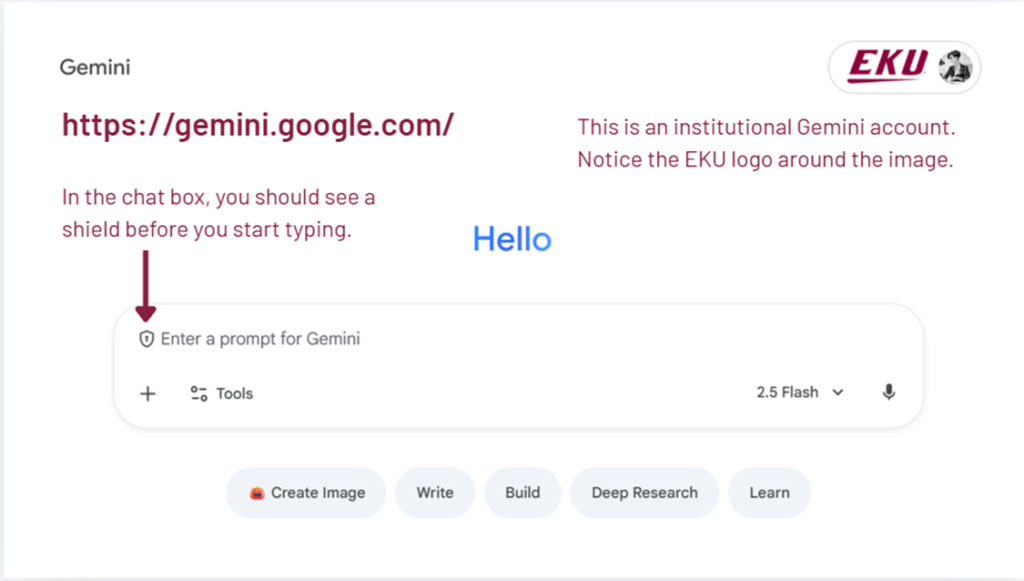
Current university-contracted AI tools available through EKU-supported accounts include:
When using contracted tools:
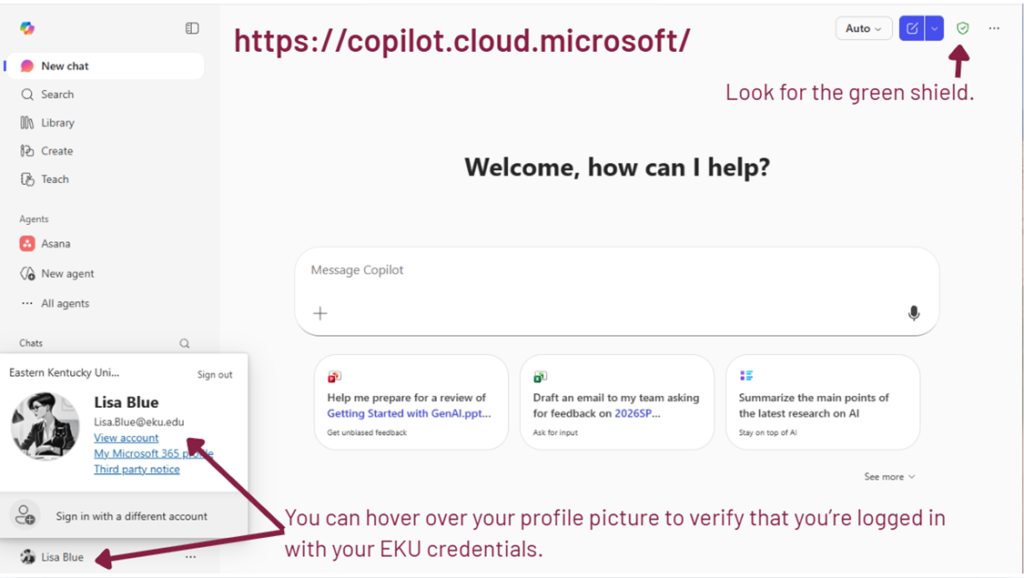
In Google Gemini:
Tools NOT Covered by University Contract
AI tools that are not covered by an EKU contract have not undergone EKU’s security, privacy, and contract review and may not provide institutional safeguards for university data, confidential information, or protected information. These tools may only be used with information that is public, generic, or fully de-identified. Appropriate uses may include:
They may not be used to process, transmit, or store University data, including confidential, proprietary, FERPA-protected, or Personally Identifiable Information.
Removing a student’s name does not automatically make student work safe to upload. Student writing may contain personal information, class-specific context, protected educational information, or student intellectual property.
If you are unsure whether something counts as University data, assume it does and do not enter it into a non-contracted AI tool.
Prohibited Tool
The following tool is not permitted for institutional use due to unresolved security concerns: DeepSeek
AI Guidance for Teaching and Learning
For guidance on AI in teaching, learning, assessment, syllabus implementation, student AI literacy, and academic-policy interpretation, contact the Office of Artificial Intelligence Strategies, Innovation, and Success (OAISIS).
OAISIS coordinates Eastern Kentucky University’s work at the intersection of artificial intelligence, teaching and learning, academic policy, and institutional strategy. The office helps EKU faculty, staff, students, and academic units make responsible, effective, and policy-aligned decisions about AI use.
OAISIS supports:
For academic policy guidance, consult Academic Regulation 4.1.4ACR, Course Syllabi [link?], and Academic Regulation 4.1.3ACR, Academic Integrity [link?]. 4.1.4ACR requires every EKU course syllabus to address AI use. 4.1.3ACR explains how AI-related concerns are handled within EKU’s academic integrity framework.
For consultations, instructional resources, programming, or support with responsible AI use in teaching, learning, assessment, student AI literacy, or academic work, contact OAISIS.
Requesting Institutional Review of an AI Tool
If you would like the University to adopt or formally support an AI tool, submit it for review through Procurement and IT Security. [link]
Institutional approval requires contract, privacy, and security evaluation prior to adoption.
Student Guidance
Before Using AI Tools for Coursework
Students should follow the AI expectations listed in each course syllabus and ask their instructor when expectations are unclear. AI tools may support learning, studying, brainstorming, drafting, feedback, and organization, but students remain responsible for the accuracy, quality, and integrity of the work they submit.
Students should not upload course materials, instructor-created materials, student work, research data, copyrighted materials, publisher content, proprietary information, or another student’s work unless they have permission and the tool is approved for that use.
Students should verify important AI-generated information, keep track of how they used AI, and be prepared to explain or disclose their AI use when required by the course or assignment.
EKU AI Expectations and Tool Access
Accessing EKU-Supported Tools
EKU-supported access to Copilot and Gemini provides stronger institutional data protections than personal or public accounts, but students must still follow course expectations, data protection rules, and tool-specific guidance. EKU Students can log into Copilot or Gemini using their EKU credentials (Email Login):
Where to Go for Help
| Need | Contact |
| Tool access, login issues, enterprise systems | IT |
| Security, privacy, PII, data protection | IT |
| Contracts, purchasing, vendor review | Procurement |
| Classroom use, syllabus statements, assignment design, AI literacy | OAISIS |
| Academic integrity process | Student Conduct and Community Standards |
| Legal interpretation | University Counsel |